
My portfolio has a postmortem feature. Every project page can carry write-ups of what went wrong and what I learned building it, it's the part of the site I'm proudest of, because it's the part that proves the projects are real.
Last week I wrote a second postmortem for Easebook, the saas product. Hit save in the admin. Opened the project page.
One postmortem.
I refreshed. Still one. I checked the database, both rows were there, correctly attached to the project. I checked the query, no take, no limit; it fetches every postmortem and renders them in a loop. The data was fine. The code was fine. The page simply would not show what the database contained.
Nothing was broken. A cache was doing exactly what I told it to do, I had just never consciously told it anything.
Why Next.js does this to you
The App Router's default is aggressive and correct: if a page can be rendered at build time, it will be. A page with generateStaticParams gets rendered once, during next build, into plain HTML. Every visitor after that gets a file served at CDN speed. No server rendering, no database query, no cold start.
The catch is hiding in "during build". That HTML is a snapshot of your database at deploy time. My second postmortem was written after the last deploy, it existed everywhere except in that snapshot. Publish something through your admin panel and the static page has no idea. It will happily serve last Tuesday forever.
The cruel detail that made it harder to spot: my project listing page was already dynamic, so it stayed fresh. Only the detail pages were frozen. A half-stale site is more confusing than a fully stale one, it teaches you to distrust the wrong things.
So the real question isn't "why is my content stale?" It's "what refresh strategy did I mean to choose?" There are four.
Option 1: Redeploy on every change
The zero-effort answer: content changes trigger a rebuild. Some teams literally wire their CMS webhook to their CI pipeline.
This is fine for documentation sites that change weekly. It falls apart the moment publishing is part of your daily loop, a five-minute build to fix a typo teaches you to stop fixing typos. And it couples content velocity to deploy velocity, which are two things you specifically want decoupled.
Option 2: Give up on caching (force-dynamic)
Every request renders the page from scratch. Content is always fresh, by construction.
It's the honest sledgehammer, and sometimes it's right: pages with per-visitor content, dashboards, anything where staleness is a bug by definition. But for content pages it means every visitor, and every crawler, and every AI bot scraping you at 3am, costs you a database round-trip. You've traded away the single best thing a content site has going for it: the fact that its pages barely change.
force-dynamic isn't a caching strategy. It's the absence of one.
Option 3: Refresh on a timer (time-based ISR)
Incremental Static Regeneration: the page stays static, but after five minutes the next visitor triggers a background re-render. One subtlety worth knowing, that visitor still gets the stale copy while the rebuild happens behind the scenes; the fresh page lands for whoever comes next. Visitors always get a fast cached page; freshness lags by at most your window, plus one visit.
This is a genuinely good default, and for a lot of sites it's enough. But notice what you're actually tuning: a single number that trades staleness against wasted work. Make it short and you're re-rendering pages that haven't changed thousands of times a day. Make it long and your publish button is back to lying, just for an hour instead of forever.
The deeper problem: the timer knows when to check, but you already know what changed. You're throwing that information away.
Option 4: Tell the cache what changed (on-demand revalidation)
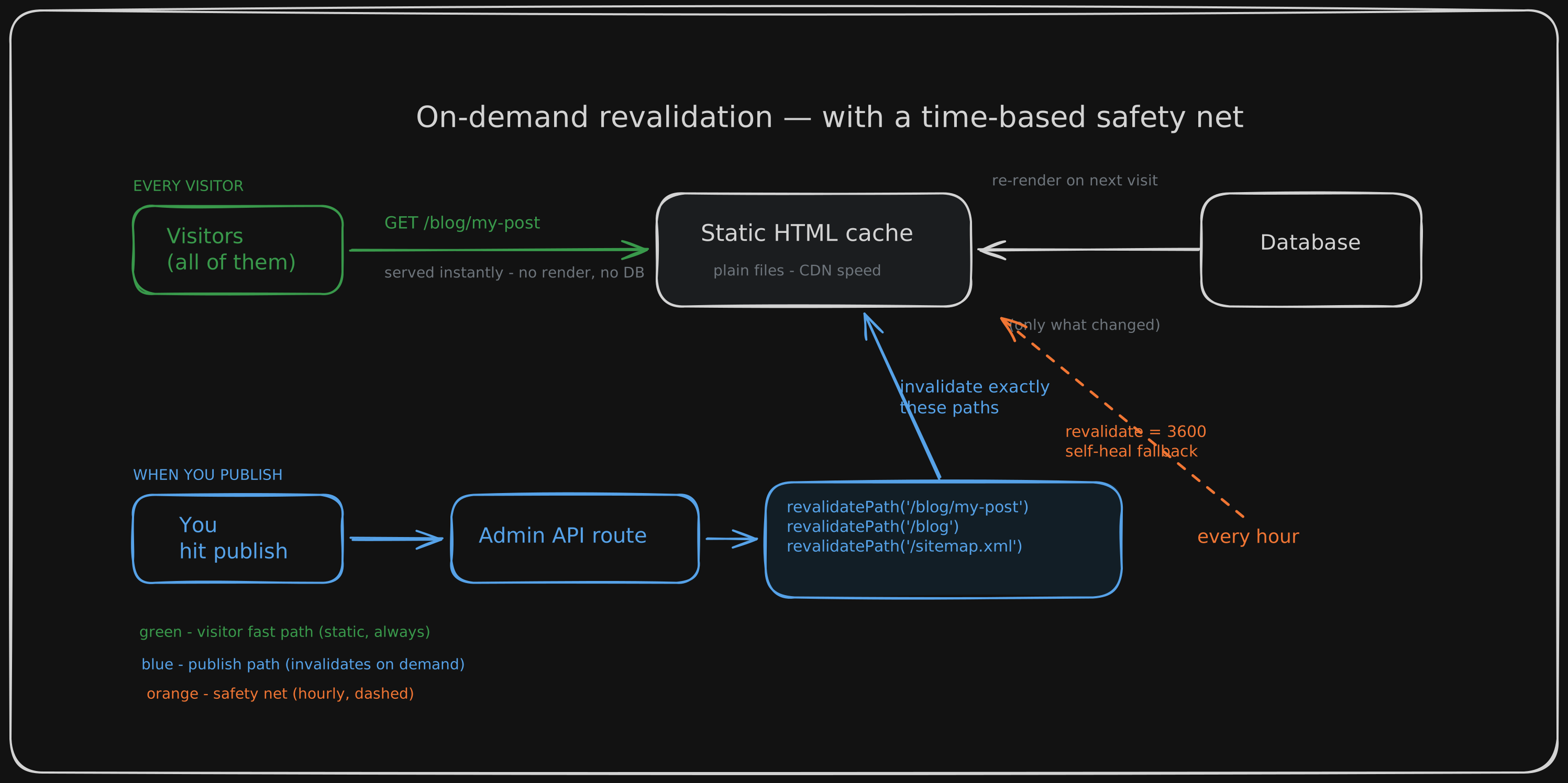
When your admin saves content, it calls revalidatePath() for exactly the pages that content appears on. Everything stays fully static for every visitor, but the instant you publish, the affected pages are marked stale and rebuild on their next request.
Publish → live in seconds. No redeploy. No timer guesswork. No wasted renders of pages nobody touched.
The cost is that you have to know your invalidation graph: a post save touches the post page, the listing, the sitemap, the RSS feed. Rename a slug and you need to invalidate the old URL too. Miss a path and that page quietly serves stale content.
Which sounds like a downside, until you realize that being forced to write down "what does this change actually affect?" is the most clarifying exercise you can do on a content site. If you can't enumerate the pages a save touches, you don't understand your own site yet.
What I actually shipped: option 4 wearing option 3 as a seatbelt
On my site, the invalidation graph lives in one small helper that maps each content type to the pages it affects. A blog save invalidates the post page (and the old URL, if I renamed the slug), the listing, the sitemap, the RSS feed, and llms.txt. A postmortem save invalidates its own page plus the parent project page it's summarized on. Every admin write route calls the right helper after a successful save — create, update, and delete alike.
The hourly timer is there for the day I'm wrong, a path I forgot to invalidate, data that changed outside the admin, a bug in my own mapping. Whatever slips through self-heals within an hour instead of persisting until the next deploy. Belt and braces.
Why this combination over the simpler options:
Visitors never pay for my convenience. Pages are static HTML; the database is only consulted when something actually changed. That's the difference between a site that survives a traffic spike on a small VPS and one that doesn't. Publishing feels like publishing. Milliseconds from save to live. The feedback loop stays tight, so writing stays cheap, so writing happens. It scales in the right dimension. More traffic costs nothing, cached pages don't care. More content changes cost one targeted invalidation each. Both curves stay flat where the naive options bend. The failure mode is graceful. A missed invalidation means "stale for up to an hour", not "stale until someone notices and redeploys".
The night this shipped, I opened Easebook's page one more time. Both postmortems, right where the database always said they were.
There's an old joke that there are only two hard things in computer science: cache invalidation and naming things. The joke survives because most of us respond to the first one by avoiding it, we force-dynamic our problems away and call it a fix.
But cache invalidation being hard is exactly why it's worth doing deliberately. The cache isn't your enemy. It's an employee who follows instructions literally. Write better instructions.
This post went live seconds after I hit save, through the exact mechanism it describes. No redeploy.